

Personal Public Information Service
I. Usage of the Information Portal Account
Open the website http://my.hhu.edu.cn, enter the user name and password in the interface shown in Figure 1 and click login.
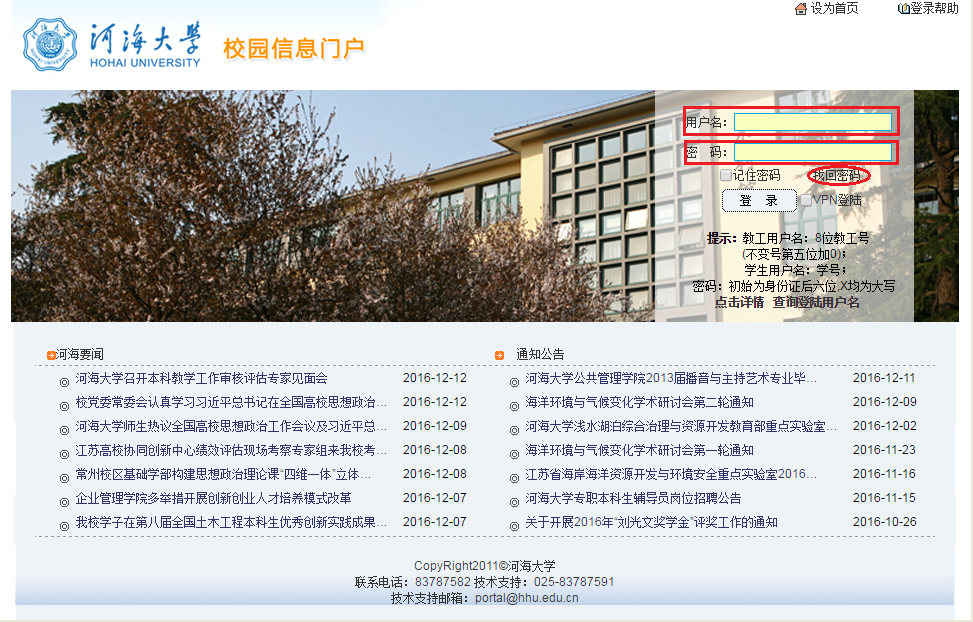
Figure 1
Account Instructions:
1) User name: 8 faculty and staff numbers for faculties and staff (assigned by the Personnel Department when entering the school.); student numbers for students.
2) Password: The initial password is the last 6 digits of the ID card.
Attentions for usage
1) The first time log in to the information portal, users will be forced to modify the initial password. It is recommended to modify and keep it properly. And users can modify the password later through the 'Personal Settings' in the upper right corner of Figure 2.

Figure 2
2) It is recommended to set the password protection question and password for retrieval mailbox in 'Personal Settings' to facilitate the retrieval of the password, as shown in Figure 3.
Moreover, users can set login aliases in personal settings, which can be used to log in to the information portal more conveniently.
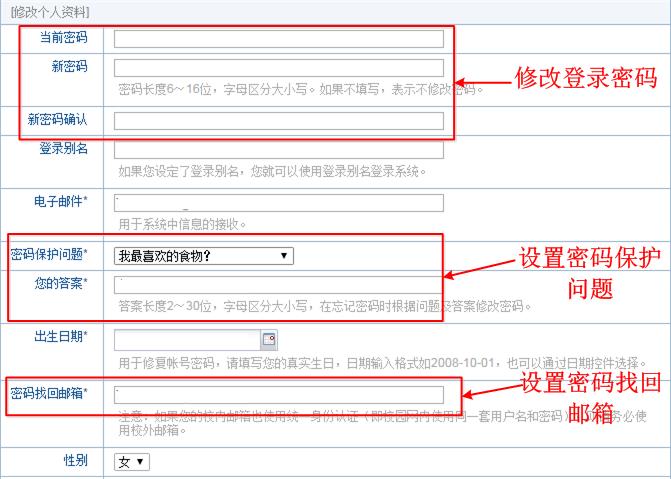
Figure 3
II. Forgot the information portal password
If you forget the password of the information portal, here are two solutions:
1) Retrieve the password online through the password retrieval function
Click the 'Retrieve Password' in Figure 1 to jump to the interface of Figure 4. In Figure 4, there are two ways to retrieve the password: the first is 'Set a new password by answering questions', that is, the password protection question set in Figure 3; the second type 'send the newly-set password connection to the registered E-mail', that is, using the password set in Figure 3 to retrieve the mailbox.

Figure 4
2) Bring the ID to reset the password
Please bring your personal ID card or student ID to the Network Library in Xikang Road Campus to reset your password.

© 2020 Copyright:Copyright of network security and Information Office of Hohai University
Address:No.1 Xikang Road, Nanjing, Jiangsu Province Mailbox:xxzxzhb@hhu.edu.cn 苏ICP备12023610号 Website Management

Official Wechat

E Hehai APP

Hehai Mobile Office APP