

Unit Iinformation Service
1 Scope of Application
Under normal conditions, the campus network is only available for users within campus to access the internet, even if it is the public IP address, it cannot be directly accessed by external networks. If users need to visit the server by the external network due to reasons such as teaching and scientific research, the user needs to submit an application to the Network Information Center to apply the off-campus access permission.
2 Application Object
1) In-service faculty members.
2) Under special circumstances, the non-in-service faculties and students shall ask the in-service faculty and staff to apply on behalf of them.
3 Application Conditions
The server opened to the outside world needs to apply for a fixed IP address in advance or has a fixed IP address.
1) The management services of servers, such as SSH, RDP, etc., please give priority to other methods such as bastion host/VPN. It is not recommended to open these services directly to the outside world.
2) The server only provides access permission to the external network. In principle, it is forbidden to access to the internet directly. When necessary, it needs to reserve or apply for a real-name network authentication account for the server.
3) If the server has to publish a website, please complete the application for website publishing service first.
4 Application Procedure
1) Confirm the basic information of the server, including the location, IP address, and the service ports needed to be opened.
2) Log in to the portal, click on the service hall, and click on the Off-campus Access Permission Application of the Server.
3) Click the instructions for filling in the form and read carefully
4) Fill in the form with authentic information. If you have any questions during the filling process, please call the Network Department of the Network Information Center
5) After filling in, click Submit in order to notify the responsible person of the unit for approval.
6) Wait for the reply from the Network Department. Or you can call to remind the Network Department.
7) Track the process until it is completed.
Application Process Diagram
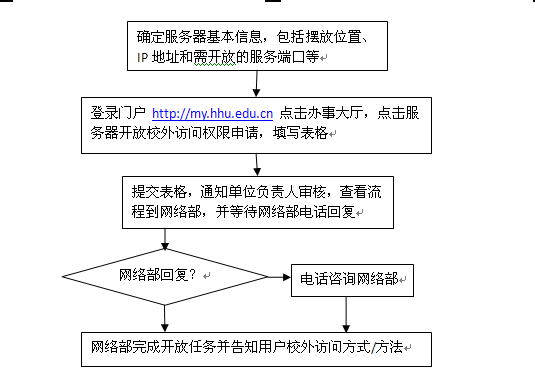
Confirm the basic information of the server, including the location, IP address and service ports needed to be opened, etc.
Log in to the portal http://my.hhu.edu.cn, click on the service hall, click on the Off-campus Access Permission Application of the Server, and fill in the form
Submit the form, notify the responsible person of the unit to review, check the process at the Network Department, and wait for the reply of the Network Department
Network Department replies?
Call the Network Department for consultation
The Network Department completes the open task and informs the user of the way/method of the off-campus access
5 Management of the Server
1) The server with access to the outside world implements the real-name management of the responsible person. The responsible person, that is, the applicant, shall bear the civil, administrative or criminal legal liabilities directly or indirectly caused by the server.
2) The server prohibits any secondary access such as proxy.
3) The responsible person of the server and the administrator shall complete the security services of the server well, such as network information.
4) If the server has any behavior that damages the system and the network, the Network Information Center has the right to block the IP until the system is repaired, and it is confirmed that such harmful behaviors will not appear again and then it can apply to the Network Department of the Network Information Center to lift the ban.
5) Losses caused by the server's own security incidents has nothing to do with the Network Information Center.
6 Supplementary Instructions
1) The default period of the server's service permission of opening to the outside world is only one year. If it needs to be extended, it shall be re-applied.
2) Any doubts occur while filling in the form, please contact the Network Department as far as possible to avoid the situation of returning the application for re-apply.
3) In principle, the server uses a private network address, and the public website address is published by the Network Information Center through reverse proxy or mapping. For the situation that the service can only be published through mapping, the server needs to apply for a separate network authentication account to connect the internet. For the situation that the service can only be published through public network address, the Network Information Center will reassign the IP address to the server for further use.

© 2020 Copyright:Copyright of network security and Information Office of Hohai University
Address:No.1 Xikang Road, Nanjing, Jiangsu Province Mailbox:xxzxzhb@hhu.edu.cn 苏ICP备12023610号 Website Management

Official Wechat

E Hehai APP

Hehai Mobile Office APP